

Events
The events pages show a tenant’s live sessions. They are public and read-only. Each landing page links to them (“Live sessions” or “Events” in the header) and its event cards link to the detail pages.
Event list
Section titled “Event list”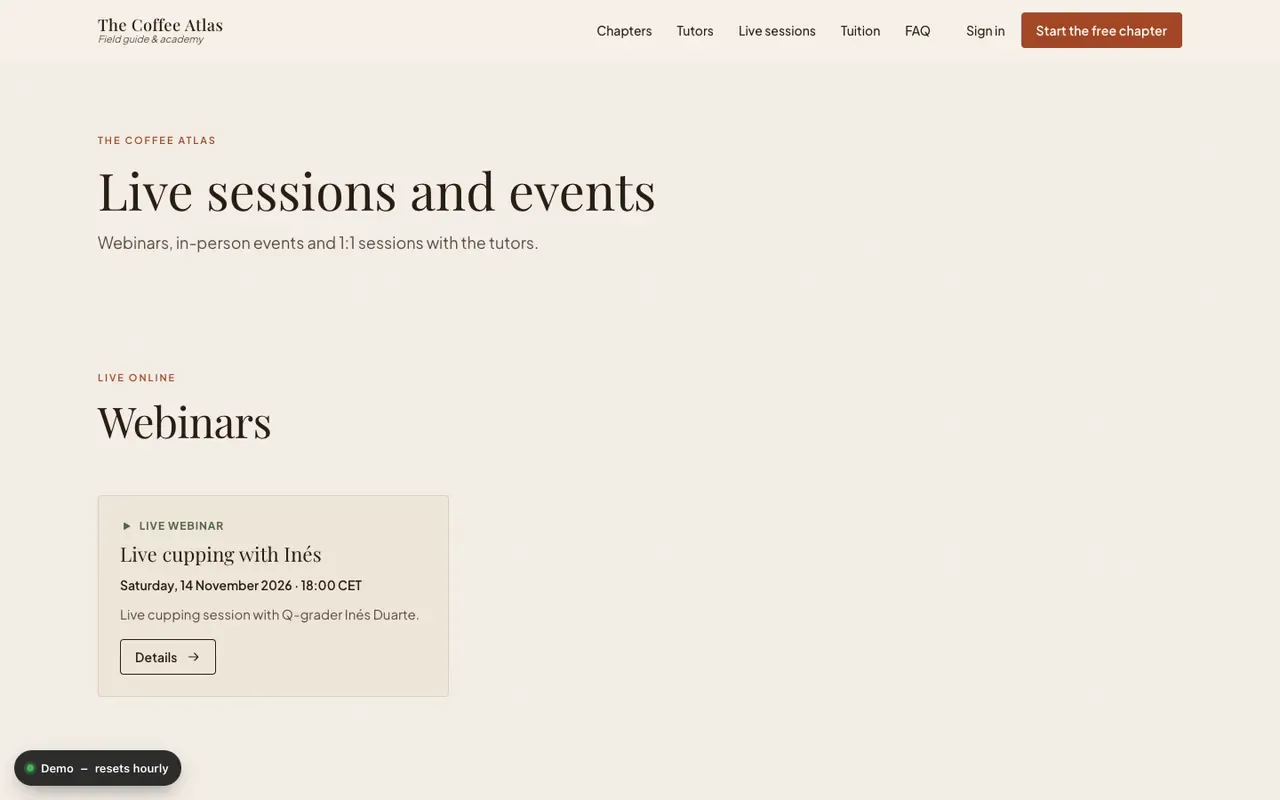
/events (“Live sessions and events”) has up to three sections, each shown only when it has
entries:
| Section | Source |
|---|---|
| Webinars (“Live online”) | The tenant’s webinars (GET /api/webinars), up to 6 |
| Events (“Meet in person”) | In-person events (GET /api/stationary-events), up to 6 |
| Consultations (“One to one”) | Consultations (GET /api/consultations), up to 12 |
With nothing scheduled the page says “Nothing is scheduled right now.”
Event detail
Section titled “Event detail”/events/<kind>/<id> shows one item. <kind> is webinar, in-person or consultation; any
other kind or an unknown id gives the 404 page.
| Kind | Shows |
|---|---|
| Webinar (“Live webinar”) | Date, time, duration in hours, description, agenda, trainers, image |
| In-person (“In-person event”) | Date, time, place, description, agenda or program, authors, image |
| Consultation (“1:1 consultation”) | Duration, description, tutors (or the author), image, and up to eight upcoming open slots |
Descriptions and agendas are HTML from the API, sanitised before rendering. In-person event times are stored without a time zone and are shown as written (wall-clock time). A breadcrumb link goes back to all live sessions and events.
How administrators create these is described in the admin guide.