

Home and landing pages
What / shows depends on the host the learner opened:
| Host | / shows |
|---|---|
A tenant host, e.g. coffee.app.localhost |
The tenant’s landing page |
A platform host (ULAMS_PLATFORM_HOSTS, default app.localhost, localhost, 127.0.0.1) |
The ulams platform page (/platform) |
| Any other host | The landing page of ULAMS_DEFAULT_TENANT (default coffee); if that variable is empty, the demo picker (/tenants) |
Tenant landing page
Section titled “Tenant landing page”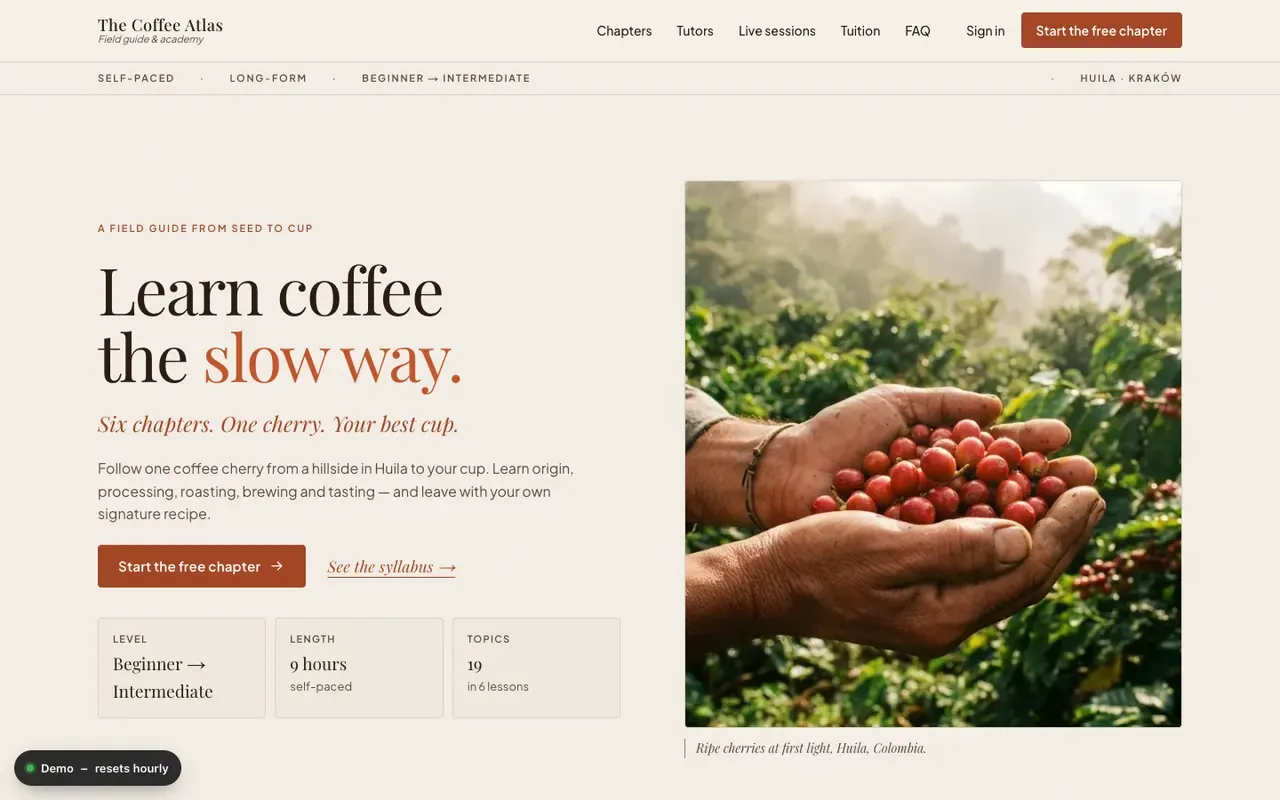
The landing page sells the tenant’s course. Its layout is one of six designs, chosen from the
tenant’s theme setting (theme.theme): coffee (editorial), oncall (dark, console-like), nightsky (playful), gravity (dark space), poland (cartographic)
or ulam (archival notebook). A tenant without one of these themes gets the coffee design. The accent
colour comes from theme.accent and is adjusted on the server so text keeps AA contrast.
All content comes from the tenant’s API; nothing on the page is invented:
- Course. The landing features the tenant’s first course from
GET /api/courses: title, summary, program (lessons and topics with their formats and durations), tutors and facts such as level and length. There is no multi-course catalogue page yet. - Landing texts. Headline, sub-headline, call to action, testimonials, FAQ and lists such as
“For parents” come from the course’s
fields.landingextra fields, with fixed defaults when a field is empty. - Events. Upcoming webinars and in-person events, linking to their event pages.
- Pricing. The tenant’s shop products and prices. The demos say that every lesson is open in the demo; buying is not possible in the reference frontend (see course page).
The header links to sections of the page, to /events, and to “Sign in” (/login). When the
learner has a session, “Sign in” becomes “My learning” and links to account.
The main call to action (“Start the free chapter”, “Start the briefing”, “Start mission 1 - free”) opens the first free-preview topic in the course player, or the first topic when the course has no free preview.
Each design arranges the same data differently:
| Design | Sections |
|---|---|
coffee |
Status bar, editorial hero, chapter index, letter from the tutors, formats, testimonials, live session, pricing, FAQ, newsletter band |
oncall |
Status bar, console hero, curriculum, game-day features, instructors, testimonials, events, pricing, FAQ, call-to-action banner |
nightsky |
Adventure hero, mission map, badges, formats, “For parents” and “For teachers”, testimonials, events, pricing, FAQ, call-to-action banner |
gravity |
Cosmos hero (the live simulation when the course has one), feature tiles, orbit syllabus, badges, sources, FAQ, call-to-action banner |
poland |
Atlas hero (the live map when the course has one), feature tiles, atlas table of contents, badges, sources, FAQ, call-to-action banner |
ulam |
Notebook hero (the live interactive when the course has one), the interactive formats, timeline, sources, badges, FAQ, call-to-action banner |
Every page of a tenant also shows the demo badge in a corner, “Demo - resets hourly”, with links to the tenant’s admin and the other demo academies. It is shown on every tenant, whether or not demo mode is on.
Platform page
Section titled “Platform page”/platform is the ulams product page, shown on platform hosts (it returns 404 on a tenant host).
The same page is served in Polish at /pl/ and in Simplified Chinese at /zh/ (platform hosts only; / stays English).
The header has a language switcher (EN, PL, 中文) next to the navigation links; it keeps the section you are reading, and
each language page has its own <html lang>, canonical URL and hreflang alternates. Chinese uses the system fonts of the
reader’s device.
It uses its own neutral theme and contains:
- the product hero with an example update-proposal diff, labelled as an illustration;
- the product’s advantages, with Living Course and commerce marked “Coming”;
- the Living Course flow, marked “On the roadmap”;
- a card per demo academy (
ULAMS_DEMO_TENANTS, six by default: the Coffee Atlas, On-Call, Night Sky Explorers, Gravity Lab, Poland, Measured and The Scottish Book), in a grid of three columns on a desktop and one on a phone, with a short description, its style, its lesson and topic counts from the tenant’s API, “Free” instead of a price for the free demos, and two buttons: “Open as learner” opens the course in the player (signed in automatically as the demo student) and “Open as admin” opens the tenant’s admin (signed in automatically when demo mode is on); - the supported standards, with LTI 1.3 and webhooks marked “coming”;
- a self-hosting section with the commands to run ulams.
Locally, open it at http://localhost:4321; see local hosts.
Demo picker
Section titled “Demo picker”/tenants is a plain page titled “ulams demos” with one button per demo academy (The Coffee
Atlas, On-Call, Night Sky Explorers, Gravity Lab, Poland, Measured, The Scottish Book). Each button links to http://<slug>.app.localhost on the
current port. The root page shows it when the host matches no tenant and no default tenant is
set.